OG images
How to Fix iMessage Link Previews (Open Graph for Apple Messages)
July 13, 2026 · 8 min read · Grabbit Team
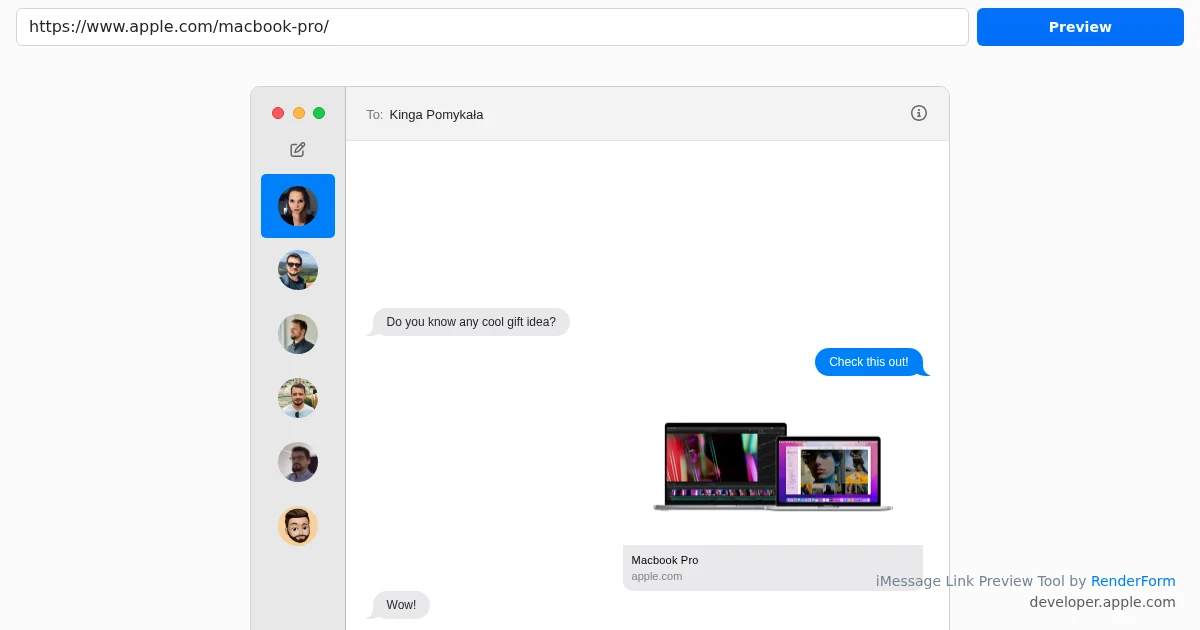
When you send a link in iMessage, it should turn into a rich card with a title, the domain, and an image instead of a bare blue link. When it stays a plain gray bubble or shows no image, the cause is almost always one of two things: the URL is not positioned where Messages will build a preview, or the page you linked is missing the Open Graph tags Apple Messages reads. This guide covers both, including how to give the card a real image of your page.
First, check where the URL sits in the message
Before you touch your page, rule out the iMessage-specific quirk. Messages only generates a preview when the link is at the very beginning or the very end of the message, and when there is a single URL in it. A link buried in the middle of a sentence, or two links in one message, frequently renders as plain text with no card. This is behavior on Apple's side, not a problem with your page.
So the first test is simple: send the URL on its own line, or as the last thing in the message, with nothing else. If the preview appears, the page is fine and the earlier message just had the link in the wrong spot. If it still comes up bare, the fix is on your page, which is the rest of this guide.
How iMessage builds a link preview
Messages does not screenshot your page or infer its content. When you send a URL, it fetches the raw HTML and looks for Open Graph meta tags in the <head>. Apple documents this directly in its developer technote, TN3156 (Create rich previews for Messages), which states that you use the og:image property to include an image in the preview. Those tags drive the whole card:
<meta property="og:title" content="Your Page Title" />
<meta property="og:description" content="A one-line summary of the page." />
<meta property="og:image" content="https://yourdomain.com/og.png" />
<meta property="og:url" content="https://yourdomain.com/page" />
og:title becomes the headline, og:description the subtext, and og:image the picture. If a page has no Open Graph tags, Messages falls back to a plain link with just the domain and a generic icon. That is what a "broken" preview almost always is: missing or unreadable tags, not an iMessage bug. These are the same tags Facebook created and that LinkedIn, Discord, X, and WhatsApp also read, so fixing them helps everywhere at once.
Two details trip people up on iMessage specifically:
- Messages reads the raw HTML, not the rendered page. It does not run your JavaScript. If your meta tags are injected client-side (a single-page app that sets them after load), Messages never sees them. The tags must be in the HTML the server sends.
og:imagemust be an absolute, public https URL. A relative path like/og.pngwill not resolve, and an image behind a login or a redirect Messages cannot follow renders as no image. Use the fullhttps://yourdomain.com/og.pngand confirm it loads in a private browser window.
How to fix an iMessage link preview
Work through this in order:
- Add the four
og:tags above to the page's<head>, server-rendered. - Set
og:imageto an absolute, public https URL that returns an actual image, not an HTML page. - Use a 1200 by 630 image. That is the 1.91 to 1 ratio Messages renders as a full card, and the same image works on every other platform.
- Confirm the tags are in the served HTML. View source on the live URL (or
curlit) and check the tags are present before any JavaScript runs. - Send the URL at the start or end of the message so Messages actually builds the preview.
The one part that is more work than typing four meta tags is producing the image itself, especially if you want it to reflect the actual page rather than a generic logo.
Making the og:image a real render of your page
For a marketing page, a docs page, or a launch announcement, the best preview image is often a clean shot of the page itself. You can produce that with a screenshot API: point it at the URL, get back a hosted image, and use that image as your og:image.
curl https://api.grabbit.live/v1/grabs \
  -H "Authorization: Bearer sk_live_..." \
  -H "Content-Type: application/json" \
  -d '{
    "url": "https://yourdomain.com/og",
    "width": 1200,
    "height": 630,
    "format": "webp",
    "delay_ms": 500
  }'
The response includes a hosted image_url:
{
  "id": "grb_01jx...",
  "status": "done",
  "image_url": "https://cdn.grabbit.live/grabs/grb_01jx....webp",
  "width": 1200,
  "height": 630,
  "format": "webp",
  "bytes": 48210,
  "execution_ms": 1240
}
width accepts 320 to 1920 and height 240 to 1080, so the 1200 by 630 card is in range. format accepts png, jpeg, or webp; webp (or jpeg) keeps the file small so the card loads fast on a phone. delay_ms (0 to 10000) gives client-rendered content or web fonts a moment to settle before the capture fires. Drop the returned image_url into your tag:
<meta property="og:image" content="https://cdn.grabbit.live/grabs/grb_01jx....webp" />
Capture once per unique page and cache the image_url alongside the page record rather than rendering on every request. A common pattern is to build a dedicated /og route with your normal components, capture that, and reuse the result everywhere. The same template-and-cache approach is covered in how to generate dynamic OG images from any URL.
The upside of one correct og:image is reach: iMessage, WhatsApp, Facebook, LinkedIn, X, and Discord all read the same 1200 by 630 Open Graph image, so a single tag fixes the preview everywhere at once. The platform-specific steps differ mainly in how you refresh the cache, which is the next section.
Bust the iMessage cache with a fresh query string
This is the step people miss. Messages caches the preview per URL on each device the first time a link is fetched. Because the crawl happens on-device and there is no server-side scrape, there is no global "re-scrape" button like Facebook's Sharing Debugger or LinkedIn's Post Inspector. If a preview already generated with the wrong image (or none), editing your tags will not update it on its own.
The reliable fix is the query-string trick: append a unique query string such as ?v=2 (https://yourdomain.com/page?v=2). Messages treats it as a new URL with no cache entry and fetches fresh, so the card regenerates from your current tags. Bump the number (?v=3, ?v=4) each time you want a clean re-fetch.
Because the cache lives on each device, someone who saw the old preview may keep seeing it for the original URL until it expires. A new query string is the cleanest way to guarantee everyone gets the corrected card. Once your tags are confirmed correct, you can go back to the clean URL for real sends.
Why your preview still is not showing
If the tags are present, the image URL works in a browser, the URL is at the start or end of the message, and the card still looks wrong, run through these:
- The URL is not isolated. Re-check that there is only one link in the message and it sits at the very beginning or end. This is the most common iMessage-specific cause.
- Tags are set by JavaScript. Messages reads static HTML and does not execute scripts. Server-render the meta tags.
- The image is behind auth or a redirect. If
og:imagerequires a login, sits behind a paywall, or redirects in a way Messages will not follow, the card renders without an image. Test the raw image URL in a private window. - A stale preview is cached. If the tags are correct now but the card still shows an old version, append
?v=2to force a fresh fetch.
Work top to bottom: confirm the URL placement first (it is the iMessage-specific gotcha), then confirm the tags are server-rendered, then confirm the image is public.
The short version
An iMessage link preview is just your page's Open Graph tags, rendered as a card, and it only builds when the URL sits at the start or end of the message. Add og:title, og:description, og:image, and og:url server-side; make og:image an absolute, public https URL at 1200 by 630; then send the link on its own (or append ?v=2 to bust a stale preview). If you want the image to be a real render of the page instead of a static logo, a screenshot API turns the live URL into the hosted image you point og:image at. The same approach fixes WhatsApp link previews and LinkedIn link previews, and if you are new to the format, start with what is an OG image.
FAQ
- Why does one link not have a preview in iMessage?
- Two common causes. First, iMessage only builds a preview when the URL is at the very beginning or the very end of the message and there is a single URL in it. A link in the middle of a sentence, or two links in one message, often renders as plain text. Second, the page you are sharing may have no Open Graph tags, or an og:image that is unreachable, so there is nothing for Messages to draw a card from. Put the URL on its own and confirm the page's og:title, og:description, and og:image are in the served HTML.
- How do I make my website show a rich preview in iMessage?
- Add Open Graph tags to the page's HTML head, server-rendered so Messages sees them in the raw HTML: og:title, og:description, and og:image. Apple's own guidance (Technote TN3156) says to use the og:image property to include an image in the preview. Make og:image an absolute https URL that is publicly reachable, ideally 1200 by 630 pixels. Then share the link with the URL at the start or end of the message.
- Does iMessage use Open Graph tags?
- Yes. When you send a link, Messages fetches the page's HTML and reads Open Graph meta tags (og:title, og:description, og:image) to build the rich preview card. Apple documents this in TN3156, Create rich previews for Messages, which specifically points at og:image for the preview image. Messages does not screenshot your page or run your JavaScript, so the tags must be present in the server-rendered HTML, and og:image must be an absolute, public URL.
- How do I refresh an iMessage link preview after changing my OG tags?
- Messages caches the preview per URL on each device, and there is no global re-scrape tool like Facebook's Sharing Debugger. For a link already sent, append a unique query string such as ?v=2 so Messages treats it as a new URL with no cache entry and fetches fresh. Editing your tags alone will not update a preview that already generated on someone's device.
- What size should an iMessage link preview image be?
- Use 1200 by 630 pixels, the standard 1.91 to 1 Open Graph ratio. That is the same og:image that Facebook, LinkedIn, X, Discord, and WhatsApp read, so one image covers every platform. Keep the file reasonably small (WebP or JPEG) so it loads quickly on mobile; a heavy full-color PNG can be slow to fetch on a cellular connection.
Capture any website with one API call
Get a free test key and wire your first request in two minutes.
Written by
Grabbit Team
Screenshots as a service
The team behind Grabbit, the screenshot API for developers and AI agents. We write about web capture, rendering, and automating screenshots at scale.
Keep reading
How to Fix WhatsApp Link Previews (Open Graph for WhatsApp)
Why your link shows up bare in WhatsApp, and how to fix it: add the right Open Graph tags, point og:image at a real render of your page, keep the image under 600KB, and re-send to bust WhatsApp's per-device cache.
Jul 9, 2026 · 8 min read
How to Fix LinkedIn Link Previews (Open Graph for LinkedIn)
Why your LinkedIn link shows up bare or with the wrong image, and how to fix it: add the right Open Graph tags, point og:image at a real 1200x627 render, and force LinkedIn to re-scrape with Post Inspector.
Jun 24, 2026 · 7 min read
What Is an OG Image? Why Your Shared Links Look Broken
An OG image is the preview image that appears when a link is shared on social media. Learn what it is, why it breaks, and how to automate one per page.
Jun 13, 2026 · 5 min read