Dev frameworks
Playwright Screenshot on Failure: Debug Failing Tests with Auto-Captures
July 6, 2026 · 7 min read · Grabbit Team
Set screenshot: 'only-on-failure' in your Playwright config and the test runner captures the rendered page the instant a test fails, then attaches it to the HTML report. Instead of reading a stack trace and guessing what the page looked like, you open the report and see it: the missing button, the empty list, the modal that never appeared. This guide covers the one-line config, how the capture lands in the report, the trace-versus-screenshot distinction, and where a hosted render fits when the failing page is one your test does not control.
The one-line config
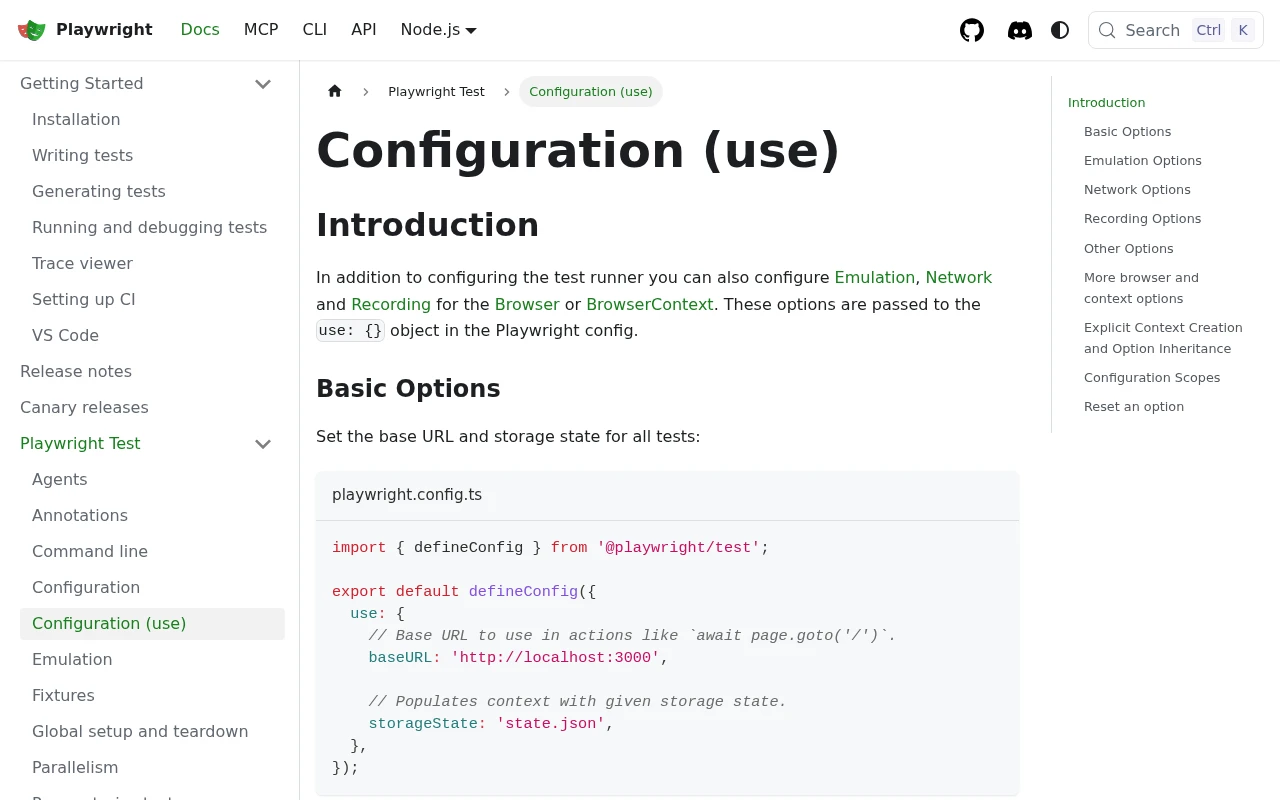
Add the option to the use block of playwright.config.ts:
import { defineConfig } from '@playwright/test';

export default defineConfig({
  use: {
    screenshot: 'only-on-failure',
    trace: 'on-first-retry',
  },
});
That is the whole setup. The test runner now captures a screenshot at the end of every failing test and attaches it to the report. You do not call page.screenshot() anywhere in your tests; the runner does it for you when a test throws.
The screenshot option takes four values:
'off'(default) captures nothing.'on'captures on every test, pass or fail. Useful for a full visual record, noisy for a large suite.'only-on-failure'captures a screenshot only when a test fails. This is the option you want almost always.- An object like
{ mode: 'only-on-failure', fullPage: true }captures the full scrolling page instead of just the viewport on failure.
The full-page form is worth calling out, because a failure is often below the fold:
use: {
  screenshot: { mode: 'only-on-failure', fullPage: true },
},
Where the screenshot lands
Failure screenshots go to the test output directory (test-results/ by default) and attach to the HTML report. Generate and open the report:
npx playwright test
npx playwright show-report
Click the failing test and the capture renders inline, next to the error message. You see the page as it was when the assertion blew up, so a "button not found" error becomes obvious the moment you notice the page rendered an error state instead of the dashboard.
In CI you will not run show-report interactively; you upload the report as an artifact and download it after the run. The screenshot automation in GitHub Actions guide covers the workflow, but the key step is uploading test-results/ with if: always() so the artifact is saved precisely when tests fail:
- name: Upload Playwright report
  if: always()
  uses: actions/upload-artifact@v4
  with:
    name: playwright-report
    path: playwright-report/
    retention-days: 7
The if: always() matters: the default if: success() skips the upload exactly when a test failed and you need the screenshot.
Screenshot versus trace: capture the moment, not just the aftermath
only-on-failure captures the page's final state, after the test has already failed. That is usually enough to diagnose the problem, but not always. If an action failed three steps earlier and the page kept changing, the final screenshot can mislead.
For the exact moment, enable tracing:
use: {
  screenshot: 'only-on-failure',
  trace: 'on-first-retry',
},
The trace records a DOM snapshot before and after every action, plus network activity and console logs. Open it with the trace viewer:
npx playwright show-trace test-results/.../trace.zip
Now you can scrub through the run and watch the page at each step, so you see the state at the moment the failing click or expect ran, not just where it ended up. Use the screenshot for a fast "what did the page look like," and the trace for "what exactly happened, step by step."
The same option across languages
The related searches for this term are dominated by the language variants, because the config value is the same idea everywhere:
- JavaScript / TypeScript:
screenshot: 'only-on-failure'inplaywright.config.ts. - Python: pass
--screenshot=only-on-failureon thepytestcommand line, or set it inbrowser_context_args. Thepytest-playwrightplugin attaches the capture to the pytest report. - C#: set
ScreenshotMode.OnlyOnFailure; the NUnit integration attaches it to the test result. - Java: there is no built-in
only-on-failureconfig, so you wire it in a TestNG or JUnit listener that callspage.screenshot()in theonTestFailurehook.
The mechanism is identical: the runner (or your listener) takes a capture when a test throws and files it with the report.
When the failing page is not yours to drive
Playwright's failure capture works on the page the test controls, which is the right tool for your own app under test. Two cases fall outside it.
The first is an external URL the test references but does not drive. If a test asserts against a third-party embed, a status page, or a partner site, only-on-failure captures your page, not theirs. Capturing that external URL means a separate render.
The second is cross-environment consistency. A screenshot taken on a developer's macOS runner and one taken in a minimal Linux CI container can differ in font rendering and antialiasing, which turns into flaky visual diffs. Pinning the render to a fixed OS and font stack removes that variable.
Both are jobs for a hosted render. Here is a failing test capturing an external URL on demand and attaching the result to the Playwright report:
import { test, expect } from '@playwright/test';

test('partner status page is up', async ({ page }, testInfo) => {
  await page.goto('https://app.example.com/dashboard');

  try {
    await expect(page.getByText('All systems operational')).toBeVisible();
  } catch (error) {
    // Capture the external status page we do not control, via the API,
    // and attach the stable image URL to the failure report.
    const res = await fetch('https://api.grabbit.live/v1/grabs', {
      method: 'POST',
      headers: {
        Authorization: `Bearer ${process.env.GRABBIT_KEY}`,
        'Content-Type': 'application/json',
      },
      body: JSON.stringify({
        url: 'https://status.partner.example.com',
        width: 1280,
        height: 720,
        full_page: true,
        format: 'webp',
        delay_ms: 500,
      }),
    });
    const { image_url } = await res.json();
    await testInfo.attach('partner-status', {
      contentType: 'text/plain',
      body: image_url,
    });
    throw error;
  }
});
The response is a hosted image URL that renders the same way on every run, because the capture happens on a fixed server, not on whichever runner CI assigned you:
{
  "id": "grb_01jx...",
  "status": "done",
  "image_url": "https://cdn.grabbit.live/grabs/grb_01jx....webp",
  "width": 1280,
  "format": "webp",
  "bytes": 48210,
  "execution_ms": 1180
}
The request fields map to the same options you already use in Playwright: full_page: true for a full-page shot, selector to crop to one element, delay_ms (0 to 10000) to wait for content to settle, width (320 to 1920) and height (240 to 1080) for the viewport, and format for png, jpeg, or webp.
To be clear about the boundary: Grabbit does not run inside your test process and it does not replace page.screenshot() for the app you are driving. It renders a URL on a server and hands back an image. For your own app's failure captures, only-on-failure is the answer; the API is for the external pages and the cross-environment consistency Playwright's in-process capture cannot give you.
The short version
For debugging your own tests, screenshot: 'only-on-failure' plus trace: 'on-first-retry' is the complete setup: the screenshot tells you what the page looked like, and the trace tells you how it got there. Upload the report as a CI artifact with if: always() so the captures survive a failed run.
Reach for a screenshot API only for the two things in-process capture cannot do: rendering external URLs your test references but does not control, and producing consistent captures from a fixed environment. For the general capture methods, see the Playwright screenshot guide; for wiring captures into CI, see screenshot automation in GitHub Actions.
FAQ
- How do I take a screenshot only on failure in Playwright?
- Set screenshot: 'only-on-failure' in the use block of your playwright.config.ts. Playwright's test runner then captures a screenshot at the end of every failing test and attaches it to the HTML report automatically. You do not call page.screenshot() yourself; the runner does it for you when a test throws.
- Where does Playwright save screenshots on failure?
- Failure screenshots are written to the test output directory (test-results/ by default) and attached to the HTML report. Open the report with npx playwright show-report and click the failing test to see the capture inline, alongside the error and any trace.
- Does 'only-on-failure' capture the exact moment of failure?
- Not quite. The screenshot is taken after the test finishes failing, so it reflects the page's final state, which is usually close enough to diagnose the problem. For the exact moment an action failed, enable trace: 'on-first-retry' and step through the trace viewer, which records a snapshot before and after every action.
- How do I capture a screenshot on failure in Playwright Python or C#?
- The config option is the same idea across languages. In Python set screenshot to 'only-on-failure' in the browser_context_args or via the --screenshot=only-on-failure CLI flag. In C# pass ScreenshotMode.OnlyOnFailure. The pytest-playwright and NUnit integrations both attach the capture to their reports.
- Can I screenshot an external URL when a test fails?
- Playwright's failure capture works on the page the test is driving. If a failing test references a third-party page you do not control, or you need a consistent render from a fixed OS and font stack regardless of the CI runner, a hosted screenshot API can capture that URL on demand and return a stable image URL you attach to the failure report.
Capture any website with one API call
Get a free test key and wire your first request in two minutes.
Written by
Grabbit Team
Screenshots as a service
The team behind Grabbit, the screenshot API for developers and AI agents. We write about web capture, rendering, and automating screenshots at scale.
Keep reading
How to Take Screenshots in Playwright (Full Page, Elements, CI)
Everything you need to take screenshots in Playwright: the viewport default, full-page captures, element-level shots, and wiring it all into CI. Plus when to reach for an API instead.
Jun 14, 2026 · 11 min read
How to Automate Website Screenshots in GitHub Actions
Capture website screenshots automatically in a GitHub Actions workflow. A single curl step that screenshots any URL on every push or deploy, stores the image, and needs no browser to install or maintain in CI.
Jun 28, 2026 · 7 min read
Visual Regression Testing: A Practical Guide for 2026
What visual regression testing is, how the baseline-and-diff workflow works, the best tools, and how consistent screenshots keep your visual tests from going flaky.
Jun 11, 2026 · 4 min read