Capture guides
shot-scraper: Automated Documentation Screenshots (and When an API Fits Better)
October 5, 2026 · 6 min read · Grabbit Team
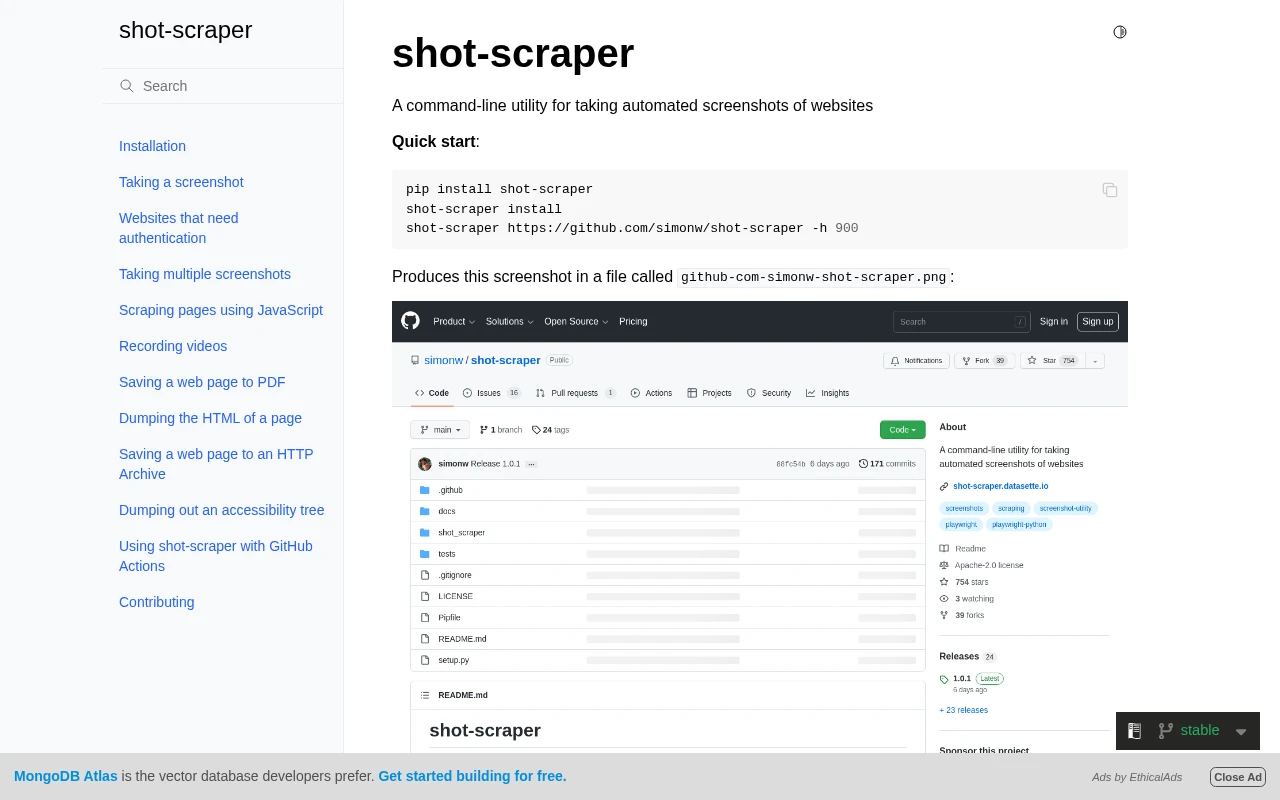
shot-scraper is a command-line tool by Simon Willison, built on Playwright for Python, for taking automated screenshots of web pages. Its original and best-known job is keeping the screenshots in your documentation up to date, so a feature screenshot does not quietly drift out of date every time the UI changes. You declare the shots you want in a YAML file, run one command, and every image regenerates.
This guide covers what shot-scraper does, how its documentation-as-code workflow is set up, how to run it in CI, and the honest trade-off: when the tool is exactly right, and when a hosted screenshot API is the simpler fit.
What shot-scraper actually does
The core command takes one screenshot:
shot-scraper https://example.com -o example.png
That launches a headless Chromium through Playwright, loads the page, and writes a PNG. On its own that is not very different from a dozen other tools. What makes shot-scraper worth knowing is the multi command, which reads a YAML manifest and regenerates a whole set of shots at once:
# shots.yml
- output: docs/images/homepage.png
  url: https://example.com/
- output: docs/images/pricing.png
  url: https://example.com/pricing
  height: 800
- output: docs/images/settings.png
  url: https://example.com/settings
  selector: "#settings-panel"
shot-scraper multi shots.yml
Now the manifest, not a person with a screen-capture key, is the source of truth for what the docs show. When the pricing page changes, you rerun the command and the image updates. That is the docs-as-code idea applied to screenshots, and it is the reason the tool exists. Willison described it on release as "a tool for keeping screenshots in documentation up-to-date," and that framing is still the strongest reason to use it.
shot-scraper also does two things a pure screenshot tool does not: it can execute JavaScript against a loaded page and return the result (scraping), and it can record WebM videos from a storyboard. If those are jobs you have, the tool earns its place on that alone.
Automating it in CI
The documentation-as-code pattern only pays off when the regeneration is automatic. shot-scraper ships a template repository that wires it into GitHub Actions: on a schedule, the workflow installs the tool, runs the manifest, and commits any changed images back to the repo. A trimmed version of the workflow looks like this:
# .github/workflows/shots.yml
on:
  schedule:
    - cron: "0 6 * * *"
  workflow_dispatch:

jobs:
  shots:
    runs-on: ubuntu-latest
    steps:
      - uses: actions/checkout@v4
      - uses: actions/setup-python@v5
        with:
          python-version: "3.12"
      - run: pip install shot-scraper
      - run: shot-scraper install        # downloads the Playwright browser
      - run: shot-scraper multi shots.yml
      - run: |                            # commit any changed screenshots
          git add -A
          git diff --quiet && git diff --staged --quiet || \
            git commit -m "Update screenshots" && git push
This is a genuinely good setup, and for a project that already lives in GitHub it is close to free to adopt. The line to pay attention to is shot-scraper install. That is Playwright downloading a browser and its system libraries into the runner on every run. It works, but it is the part you now own: the browser version, its dependencies, and the minutes each run spends installing it.
The honest trade-off
shot-scraper is excellent at what it was built for. The question is whether you want to run a browser at all.
Everything shot-scraper does, it does by installing Chromium through Playwright and driving it locally (or in your CI runner). That is the right model when you need the full toolkit: JavaScript scraping, PDF export, video recording, or screenshots of pages behind a login flow you script yourself. It is more than you need when the job is simply "turn these URLs into images and keep them current."
For that narrower job, a hosted screenshot API collapses the whole setup into one HTTP request per shot, with no browser to install or patch. The same three documentation screenshots from the manifest above become three calls:
curl -sS https://api.grabbit.live/v1/grabs \
  -H "Authorization: Bearer sk_live_..." \
  -H "Content-Type: application/json" \
  -d '{
    "url": "https://example.com/pricing",
    "width": 1280,
    "full_page": true,
    "delay_ms": 1000,
    "format": "webp"
  }'
The response includes an image_url pointing at the stored capture, which you commit into the docs or reference directly. There is no shot-scraper install step, no Playwright browser in the runner, and no system libraries to keep patched. The parameters map onto the same consistency controls shot-scraper exposes: width (320 to 1920) pins the viewport so layout is identical every run, full_page captures the whole document, delay_ms (0 to 10000) waits for lazy-loaded content to settle, format accepts png, jpeg, or webp, and selector scopes the capture to a single element, exactly like the selector field in the YAML manifest.
Here is the decision in one table:
| Your situation | Better fit |
|---|---|
| You need JavaScript scraping, PDF, or video, not just screenshots | shot-scraper |
| You script a login or multi-step flow before the capture | shot-scraper (or your own Playwright) |
| You want screenshots of public URLs, kept current, with no browser to maintain | screenshot API |
| You are already outside Python and do not want a Playwright runtime in CI | screenshot API |
| You want the capture reproducible and declarative, and either model will do | whichever you already run |
Neither is "better" in the abstract. shot-scraper trades a browser install for a self-contained, scriptable tool. An API trades the tool's full feature set for having no browser to own. Pick the one whose cost you would rather carry.
Cost, honestly
shot-scraper is free and open source, so its only cost is the CI minutes and the maintenance of the Playwright runtime it installs. A hosted API has a per-capture price but no runtime to maintain. Grabbit is $0.002 per live grab, so a docs set of 30 screenshots regenerated daily is 900 grabs a month, roughly $1.80. Annual-plan credits do not reset monthly, which suits documentation builds that run unevenly, and synchronous test requests return placeholder images at no charge so you can wire up the workflow before any real capture runs. Other tools, shot-scraper included, carry no per-grab fee at all. So if avoiding any usage cost is the priority, running the browser yourself is the honest answer. The API's trade is the reverse: a small per-capture price in exchange for never maintaining the browser.
Where to go next
If you are building scheduled or release-triggered capture into a docs pipeline, automated screenshots covers the API side in depth, and screenshot automation walks through wiring a scheduler to the render step. If your captures live in CI specifically, how to automate website screenshots in GitHub Actions shows the single-step workflow. And if you are starting from one URL, how to screenshot a website from a URL is the shorter entry point.
FAQ
- What is shot-scraper?
- shot-scraper is an open-source command-line utility by Simon Willison, built on Playwright for Python, that automates taking website screenshots and scraping data from pages with JavaScript. Its original purpose was keeping screenshots in documentation up to date: you declare the shots you want in a YAML file, run shot-scraper multi, and it regenerates every image in one pass so docs do not drift out of date as the UI changes.
- How do I keep documentation screenshots up to date?
- Declare every screenshot as a repeatable job rather than capturing by hand, then re-run the whole set on a schedule or on each release. shot-scraper does this with a YAML manifest and a GitHub Actions workflow. A hosted screenshot API does the same thing with one HTTP request per shot and no browser to install in CI. Either way the rule is the same: the capture must be reproducible, so the only thing that changes between runs is the page, not the tool or the viewport.
- Does shot-scraper run in GitHub Actions?
- Yes. shot-scraper ships a template repository that wires it into GitHub Actions on a schedule, so the screenshots regenerate automatically and commit back to the repo. You install Python, install shot-scraper, run shot-scraper install to fetch the Playwright browser, then run your YAML manifest. The browser install and its system dependencies are the part you maintain over time.
- When should I use a screenshot API instead of shot-scraper?
- Reach for an API when you do not want to own a browser at all. shot-scraper installs Chromium through Playwright and expects you to keep that runtime patched in CI. A hosted screenshot API moves the browser off your infrastructure, so capturing a URL becomes one HTTP request with no install step. shot-scraper is the better fit when you need its JavaScript scraping, PDF export, or video recording, which a pure screenshot API does not do.
- What is the difference between shot-scraper and Playwright?
- Playwright is the browser-automation library shot-scraper is built on. shot-scraper wraps Playwright in a command-line tool and a YAML format so you can declare screenshots without writing a Playwright script for each one. If you only need screenshots and not the full automation API, shot-scraper is less code than Playwright, and a hosted screenshot API is less infrastructure than either, because there is no browser to install.
Capture any website with one API call
Get a free test key and wire your first request in two minutes.
Written by
Grabbit Team
Screenshots as a service
The team behind Grabbit, the screenshot API for developers and AI agents. We write about web capture, rendering, and automating screenshots at scale.
Keep reading
Screenshot Automation: How to Capture Web Pages on a Schedule
Automate website screenshots on a schedule without running a browser. How to wire a cron job to a screenshot API, pick an interval, keep captures consistent, and store the results.
Jul 22, 2026 · 7 min read
How to Automate Website Screenshots in GitHub Actions
Capture website screenshots automatically in a GitHub Actions workflow. A single curl step that screenshots any URL on every push or deploy, stores the image, and needs no browser to install or maintain in CI.
Jun 28, 2026 · 7 min read
How to Screenshot a Website from a URL (No Browser Needed)
Skip the headless browser setup. Learn the three ways to capture a screenshot from a URL, and when a screenshot API beats Puppeteer or Playwright for production workloads.
Jun 15, 2026 · 7 min read